Your Digital Workplace : JobRouter® Features for Efficient Day-to-Day Operations
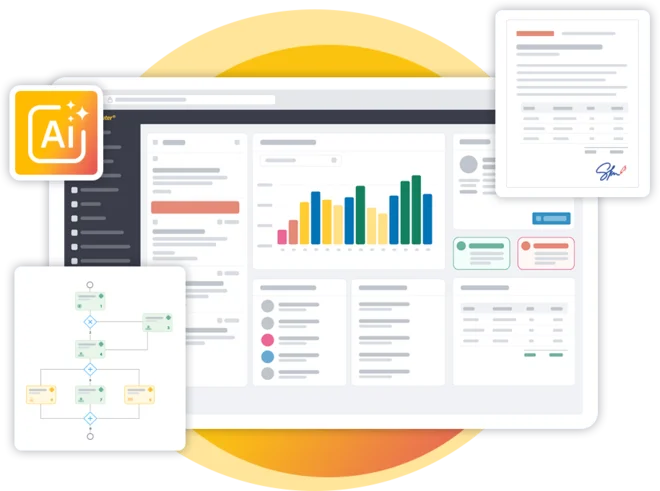
One platform, many conveniences – for everyone who designs and manages processes or wants to work productively in their daily business.
JobRouter® is a low-code digitalization platform that brings together business processes, documents, and data in a single, flexible system. Whether in a business department, IT, management, or process design—each role benefits in its own way from features that make day-to-day work more efficient, transparent, and reliable. On this page, you will learn about the overarching core features as well as the key functionalities relevant to your area of application.
Agentic AI: Intelligent Support & Secure Automation
JobRouter® uses integrated AI features to prepare information, analyze documents, or set up process steps. AI simplifies everyday work for all user groups while remaining fully controlled: it operates only within defined authorizations, does not store data permanently, and acts in compliance with the GDPR.
Example:
AI-agents summarize document content or detect deviations in an invoice, enabling users to make decisions faster, reducing the amount of manual logic process designers need to implement, and immediately alerting responsible parties to irregularities.
More AI-Features
- AI Document Analysis
- Suggestions for Process Logic
- Support for Information Research
- Automated Recognition and Classification of Data
Cross-Functional Core Features
Personal dashboard for all roles
Custom dashboards can be created for each role, providing tailored overviews of tasks, processes, and relevant information. This ensures that priorities, deadlines, and responsibilities are always clear at a glance.
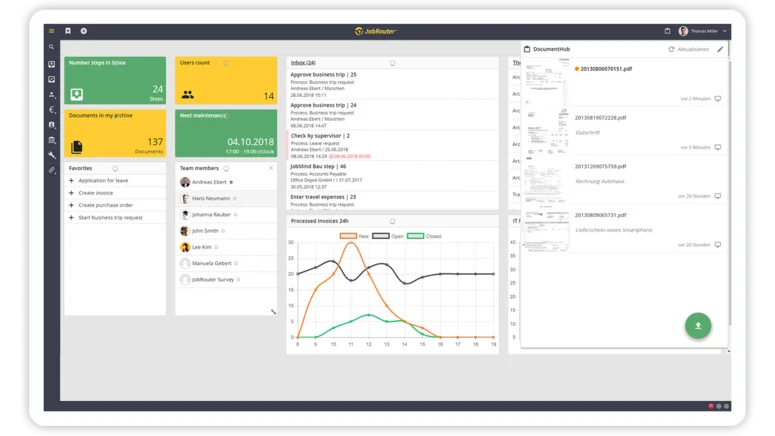
Task management & centralized process initiation
All tasks from all processes are consolidated in a central inbox. Processes can be started directly—structured, transparent, and efficient.
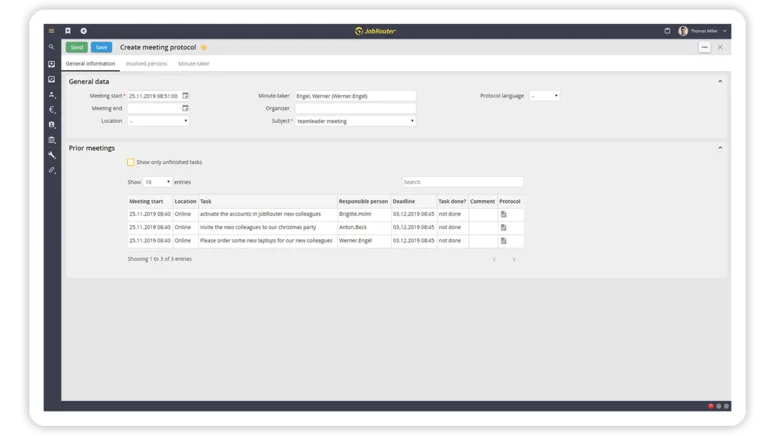
Integrated document viewing & collaboration
Documents are displayed directly within the process and can be reviewed, commented on, and compared collaboratively. This eliminates media breaks and enables seamless collaboration.
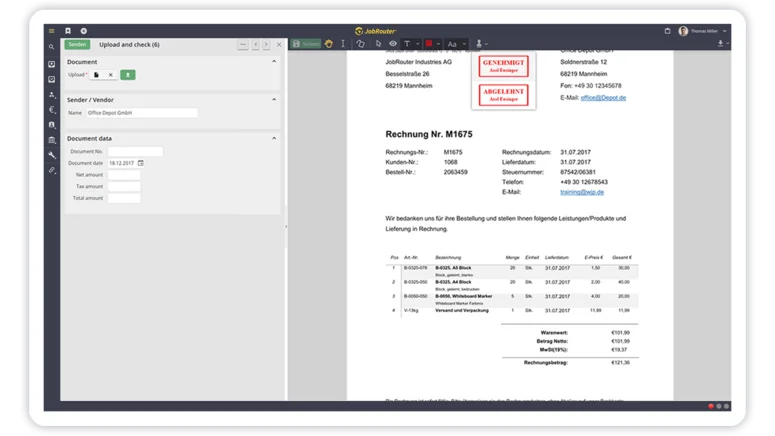
Audit-proof archiving
All documents and cases are archived in a compliant and traceable manner. Retention periods, versions, and access rights are transparently managed at all times.
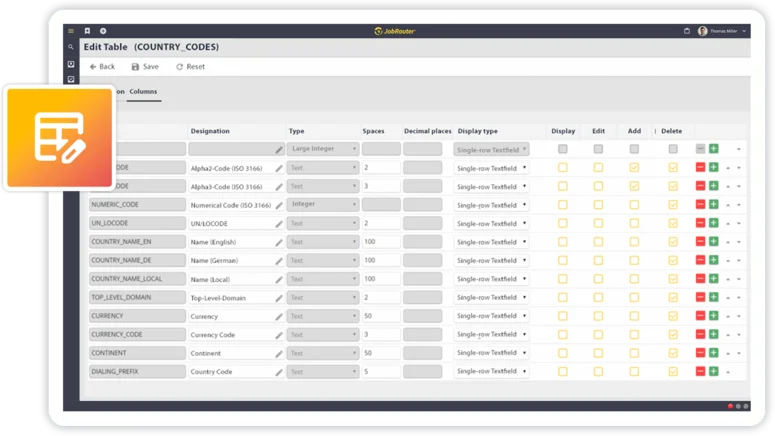
End-to-end, scalable workflows
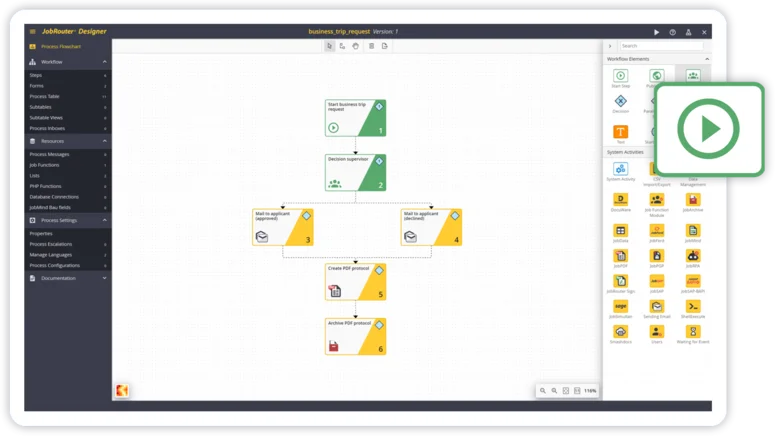
Processes run end to end from initiation to completion—automated, transparent, and scalable. This allows workflows to grow flexibly with organizational needs.
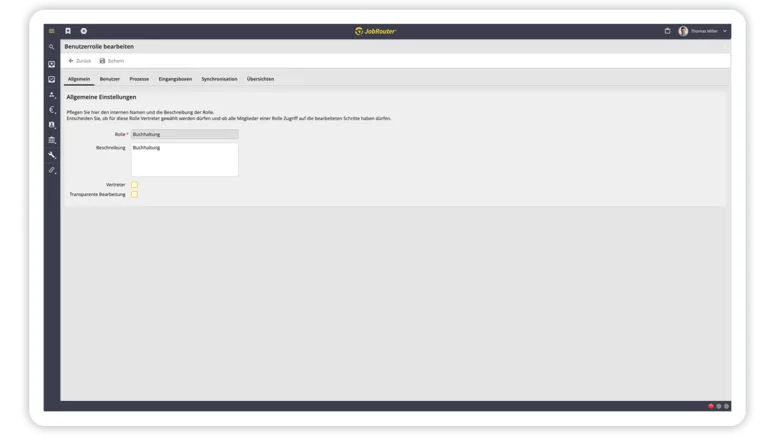
Security & compliance features
Role-based permissions, logging, and security mechanisms protect data and processes. JobRouter® supports compliance with legal and internal regulatory requirements.
JobRouter®-Features for Specific Roles
Process Designer
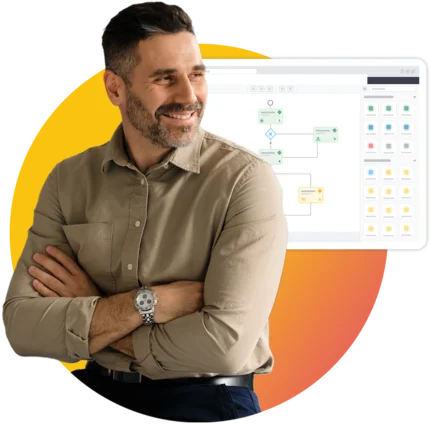
Develop digitalized processes quickly, adapt them easily, and extend them flexibly — with low-code and intelligent support.
Process designers use JobRouter® to model digitalized workflows without extensive programming. They work in a clear modeling environment to design forms, roles, data structures, and automated workflows – flexible and easy to adapt.
1. Personal Workspace & User Guidance
The process designers’ work environment provides direct access to models, versions, test environments, and quality assurance tools. AI supports the analysis of complex logic by suggesting conditions, validations, or optimizations.
Additional features:
- Model-based process overview
- Version management
- Role-based permissions for design and publication
2. Document Management & Collaboration
JobRouter® enables end-to-end processes that are designed independently of documents. This provides maximum flexibility, as processes are not tied to documents and can be extended at any time with data or documents. Whether document-heavy or data-driven processes—even up to meta-processes—JobRouter® supports them all.
Example
Processes can be initiated via notifications or documents, and both documents and data trails are archived in a revision-proof manner. This allows processes to be mapped holistically and tracked with full transparency.
Additional features:
- Document annotation & version comparison
- Mobile capture with automatic synchronization
- Structured invoice data (e.g., ZUGFeRD/XRechnung)
- Rule-based document filing
- Management of digital signature methods (simple, advanced, qualified)
- AI-driven classification & deviation detection
3. Workflow & Process Automation
Designers create workflows visually: steps, forms, conditions, role logic, parallel paths, and subtables for line items or recurring information can be defined intuitively. They determine how processes are displayed on desktop and mobile devices and which steps run automatically in the background. Automatic process starts accelerate recurring tasks and ensure end-to-end, responsive workflows.
Example:
An incoming invoice email automatically starts the invoice workflow, separates attachments, extracts data, fills table rows for invoice line items, and initiates approval based on defined role and amount thresholds.
Additional features:
- Automatic process starts (email, file, schedule, barcode)
- Definition of complex decision logic and exceptions
- Use of subtables for line-item and multi-row data
- Server-side processing steps for calculations, reconciliations, and system calls
- Escalations & deadlines for time-critical processes
- Delegations & ad hoc workflows for clarifications
- Design of mobile-ready dialogs for app or browser access
4. Data Management & Information Structure
With JobRouter®, process designers work on a clearly structured data foundation that they define themselves and can extend flexibly. They model tables, data views, master data structures, and dependencies to ensure processes are seamlessly and reliably supplied with information. This includes both the design of input forms and the technical definition of data logic – from dependencies and filters to automated validations. The result is processes that operate on consistent data, avoid errors, and scale flexibly.
Example:
Designers create a vendor table, define mandatory fields, add filters, and integrate this master data into form fields. When an invoice is processed, the system automatically identifies the correct vendor and validates values against the master data structure.
Additional features (selection):
- Creation and structuring of tables, fields, data types, and subtables
- Definition of mandatory fields, dependencies, and validation rules
- Dynamic filter and selection lists based on SQL queries or process data
- Automatic data population and calculations
- AI-supported data extraction for processing incoming documents
- Logging and data entry forms for recurring information
- Export options for data analysis (e.g., Excel, CSV)
- Use of data in subsequent processes or branching logic
- Combination of data with archived processes for analysis
5. Specific Features for Process Designers
Designers manage the entire process lifecycle: development, testing, approval, and maintenance.
Example:
A new process version is tested in the test environment and then transferred to the production environment with all settings and translations.
Additional features:
- Secure test environment for iterative development
- Transfer functions for processes & configurations
- Comprehensive multilingual support (including time zone handling & translation files)
User
Work simply, clearly, and efficiently — with a personal workspace, integrated documents, and end-to-end processes.
Users work in clear, intuitive interfaces. They receive tasks, documents, and information from other systems exactly where they need them—and are supported by automated processes and intelligent suggestions.
1. Personal Workspace & User Guidance
The dashboard displays current items, deadlines, and priorities. The central inbox consolidates all tasks from all processes into one clear, filterable view.
Example:
Open invoices, approvals, or requests appear in a shared task list where they can be sorted and prioritized.
Additional features:
- Email notifications
- Clear, role-based step guidance
- AI summaries & contextual assistance
Substitution management:
Processes remain reliable even during absences: designated substitutes receive automatic access and their own substitute inbox.
2. Document Management & Collaboration
Users work directly with documents within the process. They can review, comment on, compare, and then securely archive content. Documents can be integrated and further processed at any point in the workflow. The integrated viewer enables viewing, commenting, and comparison. Uploads are possible via desktop or mobile devices and can either be processed automatically or fed directly into workflows.
Example:
An expense receipt is scanned via the app, temporarily stored in the DocumentHub, and can then be directly assigned to the corresponding process.
Additional features:
- Integrated viewer (viewing, commenting, comparison)
- Mobile document capture & automatic upload
- Audit-proof archiving including retention periods
- PDF creation, splitting & merging
- Automatic document classification & data extraction
3. Workflow & Process Automation
Users are guided through the workflow. Automatic triggers, deadline monitoring, and escalations ensure that processes are completed quickly. Tasks can be handled from anywhere via browser or mobile app—including scanning, barcode recognition, and signatures directly on the device.
Example:
An approval process automatically reminds users of overdue steps and notifies the responsible person via email and push notification in the app. Approval can be completed on the go with just a few clicks.
Additional features:
- Server-side steps for automatic downstream processing
- Document and email recognition as process triggers
- Ad hoc steps for inquiries and clarifications
- Barcode processing & document separation
- Task and process handling via the mobile app
- Use of mobile features such as camera, location, or signature fields
4. Data Management & Information Structure
JobRouter® provides users with structured, validated, and automatically enriched data—directly within the workflow and without manual follow-up. Whether master data, information automatically extracted from documents, or tabular logs, all required information is available at the right time to support fast, error-free processing. Users always work with up-to-date, complete, and consistent data.
Example:
An incoming invoice is read automatically, the vendor is identified, amounts are captured in a structured format, and the form is prefilled with existing master data—including validation. Users only need to review and approve.
Additional features (selection):
- Automatic capture of structured data from documents (e.g., invoices, forms, delivery notes)
- AI-supported data extraction for unstructured documents
- Prefilled form fields based on existing master data
- Input validation (e.g., mandatory fields, numeric values, dates)
- Dynamic selection fields from centrally maintained data
- Tabular overviews of personal items and log information
- Structured capture of recurring information (e.g., expenses, logs, status information)
- Automatic data validation and reconciliation with existing records
- Multilingual and role-based data presentation
5. Specific Features for Users
- Responsive dialog forms for all devices
- Clear, intuitive processes
- Secure workflows during absences
- Resubmission of deferred tasks within the process context
- Automatic document filing, e.g., archiving the invoice as part of invoice verification
Process Owner

Transparent workflows, clear responsibilities, and reliable data for decision-making.
Process owners control workflows, optimize cycle times, and ensure quality. JobRouter® provides them with comprehensive transparency and powerful analysis tools to do so.
1. Personal Workspace & User Guidance
Dashboards and overviews show how processes are performing: processing times, bottlenecks, escalations, and responsibilities become immediately visible.
Example:
A process owner uses the heatmap to identify that an approval step is regularly delayed and adjusts the rules accordingly—for example, by adding additional resources to the process or coordinating a clarifying discussion.
Additional features:
- Receive AI-supported process analyses
- Use the AI chat for further process insights
- Gain visibility into process bottlenecks, delays, or inefficiencies using the heatmap
2. Document Management & Collaboration
Process owners benefit from fully documented cases and a complete document history. At any time, they can see how documents were reviewed, commented on, or forwarded, enabling reliable control of approval and review processes. Audit-proof archiving, digital signatures, and automated document processing ensure compliance with internal policies and regulatory requirements.
Example:
In a contract review process, a responsible person can trace at any time who commented on or reviewed which contract version. Deviations are highlighted automatically, and the approved contract is archived in an audit-proof manner.
Additional features (selection):
- Complete document history including review and approval steps
- Traceable versioning and commenting
- Legally compliant and audit-proof archiving of all documents
- Automatic deviation analysis (e.g., price or text changes)
- Integration of electronic signature steps for controlled approvals
- Rules for deadlines, follow-ups, and retention periods
- Access to archived documents and cases for optimization purposes
- Integration with leading systems (e.g., Microsoft, SAP) via appropriate interfaces to ensure consistent data storage structures
3. Workflow & Process Automation
Responsible users manage rules, deadlines, and exceptions and define applicable service levels and processing times. Dashboards and reports show how well these targets are met. AI highlights anomalies and prepares decision-making.
Additional features:
- Escalation management and configuration of service levels
- Automated reminders for upcoming or exceeded deadlines
- Process-specific approval rules and decision paths
- Detection of rule violations and exceptional cases
- Analytics on cycle times, bottlenecks, and workload by role or department
4. Data Management & Information Structure
Process owners use data to analyze workflows, identify optimization potential, and improve operational control. JobRouter® provides structured access to both live data and archived case information. This makes patterns visible, cycle times traceable, and quality issues quickly identifiable. In addition, AI provides insights into irregularities or deviations that would be difficult to detect manually.
Example:
An analysis shows that invoices from certain vendors require manual corrections more frequently. By reviewing data and logs, process owners identify the root cause and adjust the process or validation rules accordingly.
Additional features (selection):
- Access to structured case data, logs, and process KPIs
- Analysis of processing times, bottlenecks, and rule violations
- Comparison of historical and current data
- Access to archived cases and step-level information
- Export and restoration of archived data
- Centralized management of master data (suppliers, customers, accounts, cost centers, etc.)
- AI insights into anomalies (price changes, document deviations, etc.)
- Transparent data and audit trails
- Use of data-driven insights for process optimization
5. Special Features: Case Archiving
Completed cases remain analyzable without impacting the production system.
Additional features:
- Search across archived cases
- Restoration or export
- Offloading to external databases
- Flexible retention periods per process
Administrator

Connect systems, ensure data quality, and operate the digital workplace reliably.
Administrators integrate systems, maintain data, define permissions, and ensure the security and stability of the platform.
1. Personal workspace & user guidance
Administrators manage users, roles, integrations, and system parameters. They monitor process execution and system load to ensure the platform remains stable and high-performing.
- Central tools for system administration
- Monitoring for integrations and automations
- Management of user roles and permissions
2. Document Management & Collaboration
Administrators manage the technical foundation of document management. They configure archive structures, document classes, signature settings, email monitoring, and integrations with third-party systems. This ensures e.g. that documents are handled securely, correctly indexed, and processed in compliance with regulations—from initial intake through long-term archiving.
Example:
An administrator configures email monitoring so that incoming invoices are automatically detected, data is extracted, and the documents are assigned to a process. At the same time, they maintain archive structures, define index fields, and configure integration with an ERP system via appropriate interfaces.
Additional features (selection):
- Configuration of audit-proof archives, index fields, and retention periods
- Setup of document intake channels (email monitoring, file folders, scanners)
- Management of digital signature methods (simple, advanced, qualified)
- Definition of filing rules and document classes
- Integration of external systems via standardized interfaces
- Permission management for documents, archives, and visibility rules
- Monitoring of automated document processing (extraction, classification)
- Management of metadata structures and document formats
- Support for compliance requirements (GDPR, GoBD)
3. Workflow & Process Automation
System-level automation ensures that processes run reliably and efficiently. Administrators control all technical mechanisms that define how processes are started, monitored, and executed without user interaction.
This includes automatic process triggers via email or file monitoring, barcode recognition, scheduled triggers, and server-side process steps for validations, data reconciliation, or system calls. Escalation and reminder rules ensure that cases do not stall and that critical deadlines are met. Interfaces and web service calls also enable the automated processing of external data. Together, these capabilities form the foundation for stable, scalable, and fully automated workflows—regardless of whether the platform is operated on-premises or in the cloud.
4. Data Management & Information Structure
Administrators are responsible for a consistent, secure, and high-performance data foundation. They maintain central master data, define permissions, configure validation logic, and integrate external systems so that reliable data is available across all processes.
Example:
An administrator maintains central vendor and account lists, configures validation rules, and controls which departments can access specific data. This reduces input errors and ensures processes run more reliably and efficiently.
Additional features (selection):
- Central maintenance of master data (vendors, customers, accounts, cost centers, etc.)
- Permission management for data fields, tables, and selection lists
- Synchronization with ERP, CRM, or other line-of-business systems
- Data import and export capabilities
- Validation rules and duplicate detection
- System-wide availability of validated data for forms and workflows
- Support for multilingual data and values
- Structuring of logs and case lists
- Monitoring and optimization of data quality
5. Special Features for Administrators
Interfaces & Integrations
- SAP
- DATEV
- Intelligent Workflow
- Microsoft 365 / Office Online
- Outlook
- MS Dynamics
- SharePoint
- REST API
- and many more
Governance & Compliance
- GDPR and GoBD compliance
- Encryption and secure data transmission
- Test environments for risk-free development
- Robust role and permission model
Platform description : JobRouter® functions explained in detail