Create Electronic Signatures Digitally and Integrate Them in a Legally Compliant Way

Electronic signatures have long since become part of everyday business and, in most cases, are also admissible in court. We show you how to integrate legally compliant electronic signatures with eSignAnywhere in JobRouter®.
Since the introduction of the eIDAS Regulation, there have been standardized rules for electronic signatures across the EU. These regulations state that, in most cases, documents with digital signatures are admissible as evidence in court, for example to prove that a contract has been concluded. But how can you create a digital signature in a legally compliant way? Software with the right functionality, such as JobRouter® Sign, can help. We show you the potential of online signatures and explain how you can implement e-signatures with our tool.
JobRouter® Sign transforms the way you manage and close business transactions
As part of contract management, you create a contract template or select an existing one and fill it with the relevant information as well as the people involved. JobRouter® then automatically sends a request for approval and signature of the document to the stored email address. Only that person is able to provide the digital signature. All intermediate steps are documented and therefore comply with all legal and compliance requirements.
Certifications and Awards
JobRouter® stands for quality in all areas. Certified and recognized multiple times, the product, the company, and the platform comply with all legal requirements as well as additional security standards: your data and documents are in safe hands with us.

Integrate electronic signatures into any process in a legally compliant way — here’s how!
Define the process
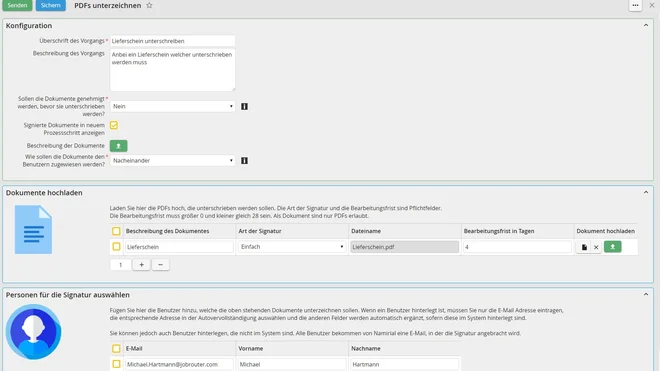
Open the start step “Sign PDFs.” In the input screen, you can define the process, for example an approval for a quote. In addition to the process name and description, you can specify whether an approval workflow should be triggered before signing and whether the document should be signed independently or in sequence. You then upload the document, select the type of signature, optionally define a processing deadline, and select the users who must sign the document.
Select the signature position
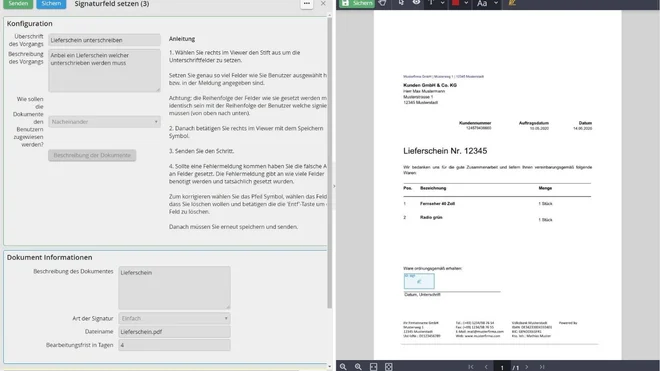
In the next step, you define where the selected individuals should place their signature(s) in the document. As soon as you submit the step, all participants are invited by email to sign the document.
Various signature options
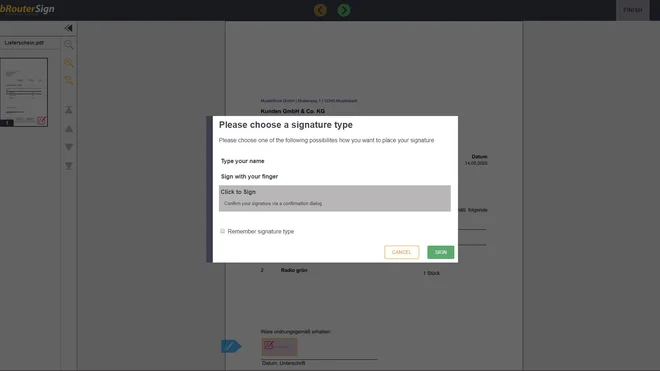
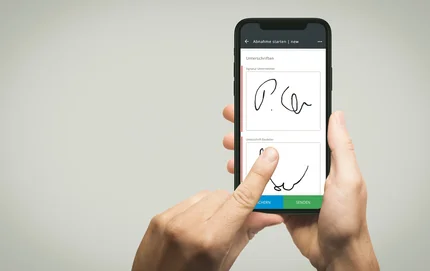
When the involved users open the document, they can choose how they want to sign it. In addition to signing on a tablet, for example, signing with a finger is also possible. In most cases, simply entering a name is sufficient and the signature is placed automatically.
Review the document

As the process initiator, you can review and, if necessary, download the signed document. In addition, an audit log is provided to document the completed signature process.
Features of JobRouter® Sign
With electronic signatures, you improve transparency throughout the entire signature process and increase employee productivity through optimized information flow in document-related work. JobRouter® Sign is available both on-premises and in the cloud.
- Fully integrated solution
- Signature initiation from any process
- Fast and unambiguous signing from any device
- Complete documentation of all intermediate steps and access events
- Audit-proof archiving of all documents
- Integration of external partners
- Support for bulk signatures
- Support for multiple documents per envelope
- Certified trust service provider
Webinar recording : JobRouter® Use Case: electronic Signature