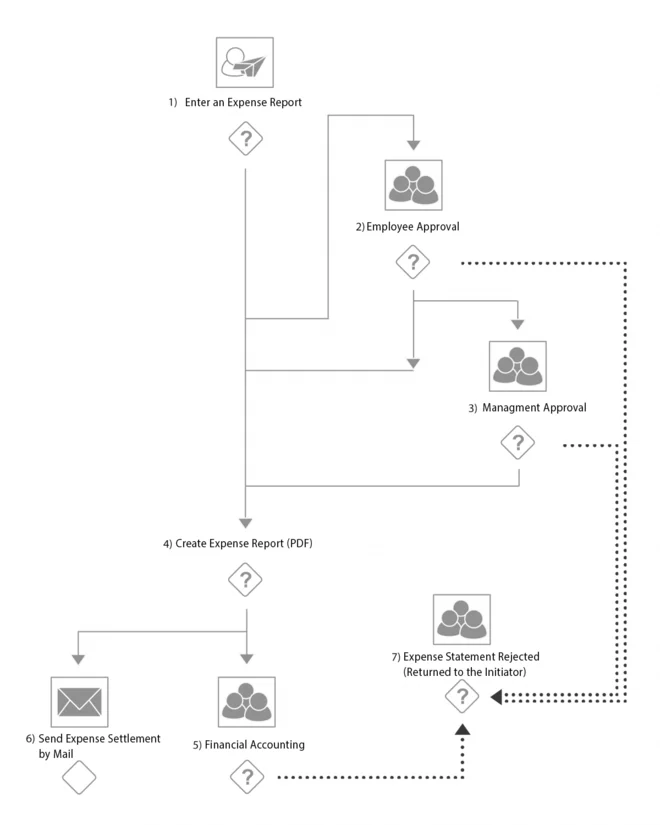
An expense report process can be launched by any employee, using “Create expense account”. This allows the employee to record expenses for themselves or, depending on the internal departmental arrangements, for other colleagues.
Simple reading of receipts
First, the start and end of the trip are selected by calendar and the purpose and destination are entered in a free text field. The expense items to be entered are divided into expense categories. General expenses, hospitality, gifts, hotel costs, mileage, accommodations, and meals per diems are available. Depending on the previously selected expense category, a selection list of expense types is available in a further column. For example, in the expense category "General Expenses" you can choose between taxi, train, flight etc..
The contents of the selection lists were defined on the basis of Metzler's special requirements. Different data must be entered according to the expense category, therefore an individual entry list was created for each category and corresponding mandatory fields were defined. In the expense detail fields, information such as amount, miles traveled, expense allowances, and currency etc. can be entered. In the case of foreign currency, the refundable amount is automatically converted using a stored exchange rate.
In the data entry dialog and in the input screens for the individual expense categories, the person entering the data is offered context-related instructions and help documents, such as extracts from legislation, internal work instructions and user manuals.
These can be looked up if, for instance, an employee is uncertain about the correct expense type or category, or they wish to know how and in what order the data entry dialog needs to be completed. If the data entry is not made by the business traveler themselves but, made by an assistant, the traveler receives the expense account for checking and approval, in a separate process step.