JobRouter® Outlook Add-in : Process Emails from Microsoft 365 Without Leaving Your Workflow

Break the limits of your email client with the capabilities of the JobRouter® platform. You continue working in your familiar Microsoft Outlook environment, while benefiting from seamlessly integrated features for process automation and document management.
Increase Your Productivity
Bring the JobRouter® process world directly to users in their Microsoft Outlook environment.
Manage Emails and Attachments in a Personal Data Store
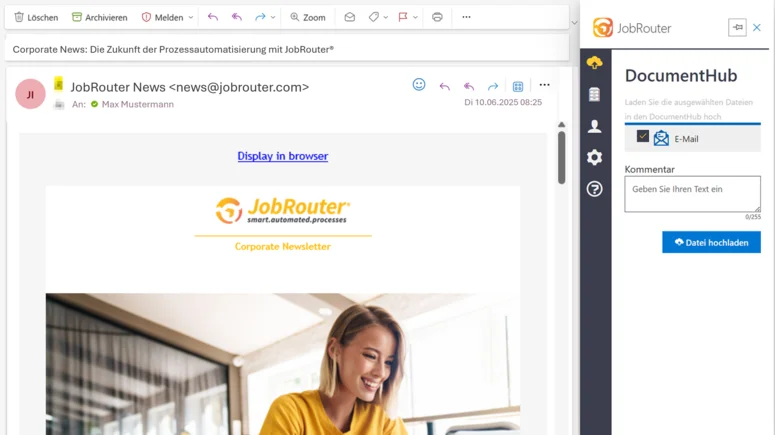
The DocumentHub is a personal document repository in JobRouter®. Capture any documents and files, store them temporarily, or make them available in other processes. For example, when handling approvals or requests, or for later email archiving.
The DocumentHub offering is fully integrated into the JobRouter® for Outlook Add-in. With just one click, emails, attachments, or both can be moved to the DocumentHub — including all comments.
Archive Emails and Attachments
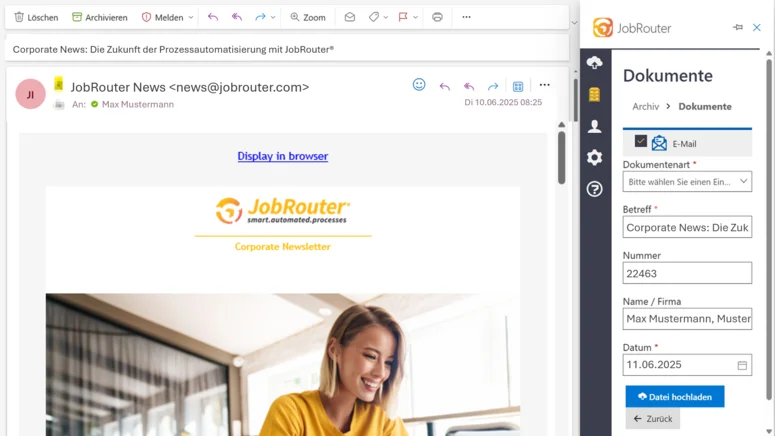
With JobRouter® Archive, comprehensive document management is integrated into the JobRouter® platform. This allows you to permanently archive incoming emails or attachments in a revision-safe manner, or retain them until a defined retention period has been reached.
- Automatic archiving via JobRouter®
- Manual archiving with index data entered by users
- Access to any archive through permission control
- Selection of content to be archived (email, attachment, metadata, all)
Start Automated Processes Directly from Outlook
Received an email or attachment in Outlook? Thanks to JobRouter®, you can now trigger automated processes based on email content, metadata, and attachments.
Incoming emails or defined attachments can become the starting point for your optimized digital workflows, such as invoice processing or the initiation of a claims process. You define in advance which information should be passed on — JobRouter® handles the rest.
In addition, the add-in supports Outlook categories. These can be assigned automatically when emails are archived or when processes are started based on an email.
Easy Configuration
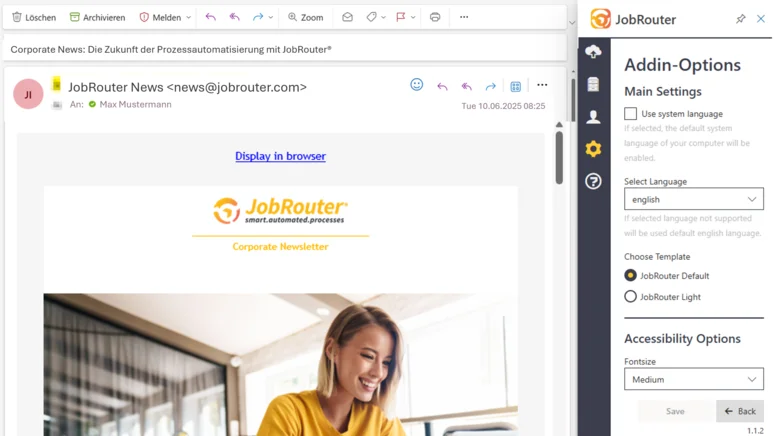
Configuring the JobRouter® for Outlook Add-in is straightforward. Administrators and process designers can define which user groups should have access to a specific archive and which processes should be available for launch in Outlook. Users can then get to work immediately and benefit from faster workflows thanks to the JobRouter® Outlook Add-in.
- High adoption through a familiar working environment
- Greater satisfaction through more convenient workflows
- More motivation through more efficient processes
Seamless Integration of Business Processes and Document Management into Your Email Client
Integrate powerful process automation and true document management into your local Outlook client as well as the Microsoft Outlook web client. With the JobRouter® for Outlook Add-in, you can, for example, start processes, archive emails, or store them in your customizable interim storage for further processing (DocumentHub). All of this happens without leaving the Outlook interface and without any media disruptions
Ihr Nutzen : Your Benefits: The JobRouter® for Outlook Add-in Offers the Following Features
- Full integration into the Outlook email client
- Full integration into Outlook on the web
- Archive emails and/or attachments in JobRouter® Archive
- Add index data with fixed values and custom filing masks
- Create predefined rules for fast tagging
- Store emails and/or attachments in your personal DocumentHub